What is a RADIUS Server? Understanding the AAA Protocol
What is a RADIUS Server? Get a clear understanding of the Remote Authentication Dial-In User Service protocol and its crucial role in centralized Authentication, Authorization, and Accounting (AAA) for network access and security

What is RADIUS?
At its core, RADIUS is a networking protocol that provides centralized Authentication, Authorization, and Accounting (AAA) management for users connecting to a network. Think of it as the bouncer at a exclusive club, checking IDs, verifying guest lists, and keeping a tab on what everyone is doing.
Authentication: RADIUS verifies a user’s identity. When you try to connect to a Wi-Fi network, log into a VPN, or access a corporate network, RADIUS is often working behind the scenes to confirm you are who you say you are. This is typically done by checking credentials like usernames and passwords against a database.
Authorization: Once authenticated, RADIUS determines what resources you are allowed to access. Should you have full network access, or just access to certain servers or applications? RADIUS makes these decisions based on predefined policies.
Accounting: RADIUS keeps a record of user activity, such as when they connected, how long they were connected, and how much data they transferred. This information is crucial for auditing, billing, and capacity planning.
How Does RADIUS Work?
The RADIUS architecture involves three main components:
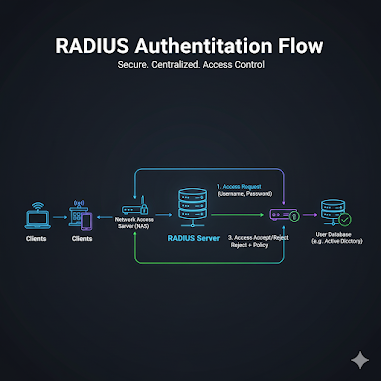
* RADIUS Client (Network Access Server – NAS): This is the device that initiates the authentication request. Examples include Wi-Fi access points, VPN concentrators, network switches, or dial-up servers. When a user tries to connect, the NAS sends their credentials to the RADIUS server.
* RADIUS Server: This is the central component that performs the AAA functions. It receives authentication requests from the NAS, validates user credentials (often by querying an external user directory like Active Directory or LDAP), authorizes access based on policies, and records accounting data.
* Backend User Directory: While not strictly part of the RADIUS protocol, the RADIUS server typically relies on an external database or directory to store user information, passwords, and access policies.
Here’s a simplified breakdown of the process:
* A user attempts to connect to a network resource via a RADIUS client (e.g., enters Wi-Fi password on their phone).
* The RADIUS client sends an Access-Request message containing the user’s credentials to the RADIUS server.
* The RADIUS server receives the request, checks the credentials against its user directory, and evaluates authorization policies.
* Based on the outcome, the RADIUS server sends an Access-Accept, Access-Reject, or Access-Challenge message back to the client.
* Access-Accept: User is authenticated and authorized.
* Access-Reject: User is denied access.
* Access-Challenge: Server requires more information (e.g., a second factor of authentication).
* If access is granted, the RADIUS server also starts accounting for the user’s session.
Why is RADIUS Important?
* Centralized Management: Instead of managing user credentials on every network device, RADIUS allows you to manage them in one central location, simplifying administration and improving consistency.
* Enhanced Security: By centralizing authentication, RADIUS helps enforce strong security policies and makes it easier to revoke access for compromised accounts. It also supports various authentication methods, including EAP (Extensible Authentication Protocol).
* Scalability: RADIUS can easily scale to support a large number of users and network devices, making it suitable for organizations of all sizes.
* Auditing and Compliance: The accounting features of RADIUS provide valuable data for security audits, compliance reporting, and troubleshooting.
* Flexibility: RADIUS is highly configurable and can be integrated with various network devices and user directories.
Common Use Cases for RADIUS
* Wi-Fi Authentication (WPA2-Enterprise): This is one of the most common applications, providing robust security for wireless networks.
* VPN Access: Securing remote access to corporate networks.
* Network Device Administration: Controlling who can log into network routers, switches, and firewalls.
* Dial-up and DSL Access: Traditionally used for authenticating users connecting via modems.
* 802.1X Wired Authentication: Providing port-level security for wired networks.
The Future of RADIUS.
While newer authentication protocols are emerging, RADIUS remains a cornerstone of network security. Its widespread adoption, flexibility, and robust feature set ensure its continued relevance. As networks become more complex and security threats evolve, the principles behind RADIUS – centralized AAA – will only become more critical.
Understanding RADIUS is essential for anyone involved in network administration or cybersecurity. It’s a powerful tool that helps ensure only authorized users access your valuable network resources, keeping your digital doors secure.