
The Essentials of Wi-Fi Certificate Authentication
Essentials of Wi-Fi Certificate Authentication in today’s digital world, keeping wireless networks safe is key. Wi-Fi certificate authentication is essential for protecting important data. It also ensures the security of enterprise Wi-Fi.

The Essentials of Wi-Fi Certificate Authentication
As we use wireless connections more, we need strong wi-fi security protocols. Certificate-based authentication is a key part of this. It helps verify who is accessing the network, making it safer and more reliable.
Key Takeaways
- Understanding the importance of wi-fi certificate authentication in enterprise wi-fi security.
- The role of certificate-based authentication in securing wireless networks.
- The significance of robust wi-fi security protocols in today’s digital landscape.
- Best practices for implementing wi-fi certificate authentication.
- The benefits of using certificate-based authentication for wi-fi security.
Understanding Wi-Fi Security Fundamentals
Building a secure network starts with knowing the basics of Wi-Fi security. It’s not just about keeping data safe. It’s also about making sure the network is reliable and available.
Common Wi-Fi Security Vulnerabilities
Wi-Fi networks face many security risks. These include:
- Unauthorized access to the network
- Data breaches and eavesdropping
- Malware distribution through the network
- Denial of Service (DoS) attacks
These threats show why strong security is essential.
Evolution of Wi-Fi Security Protocols
Wi-Fi security protocols have changed a lot over time. They’ve gotten better to fight off new threats.
From WEP to WPA3
The move from Wired Equivalent Privacy (WEP) to WPA3 has seen big steps forward:
- WEP: The first security protocol, now seen as weak because it’s easy to hack.
- WPA: A quick fix, it improved security but had its own weaknesses.
- WPA2: Became the main Wi-Fi security standard, with better features.
- WPA3: The newest standard, it offers the strongest security yet, including defense against brute-force attacks.
The growth of Wi-Fi security protocols shows why it’s key to keep up with the latest standards. This helps protect against new threats.
What is Certificate-Based Authentication?
Certificate-based authentication is a key to secure Wi-Fi. It checks the identity of devices and users on a network with digital certificates.
Public Key Infrastructure (PKI) Basics
Public Key Infrastructure (PKI) is the core of certificate-based authentication. It helps manage public-private key pairs and digital certificates. PKI makes sure the authentication process is secure by checking the identity of network entities.
PKI has important parts like Certificate Authorities (CAs), Registration Authorities (RAs), and certificate repositories. Knowing these parts is key to a strong certificate-based authentication system.
Digital Certificates Explained
Digital certificates link a public key to an identity. They are given by a Certificate Authority (CA) after checking the identity of the requestor. Digital certificates have details like the subject’s name, public key, and the issuer’s name.
X.509 Certificate Structure
The X.509 standard outlines digital certificate structure. An X.509 certificate has fields like version number, serial number, and issuer name. Knowing the X.509 structure is vital for managing digital certificates well.
Digital certificates make Wi-Fi authentication secure. They ensure only approved devices can join the network, boosting security and cutting down on unauthorized access.
How Does Wi-Fi Certificate Authentication Work?
Wi-Fi certificate authentication is key for secure network access. It involves complex steps to connect clients to Wi-Fi networks safely.
The Authentication Process Flow
When a client tries to connect to a secured Wi-Fi network, the process starts. Digital certificates are exchanged to verify identities.
EAP-TLS Protocol Mechanics are vital in this process. EAP-TLS (Extensible Authentication Protocol-Transport Layer Security) is a top choice for certificate-based authentication. It encrypts the authentication, keeping it safe from hackers.
EAP-TLS Protocol Mechanics
The EAP-TLS protocol is central to Wi-Fi certificate authentication. It ensures both the client and server are genuine.
Client and Server Verification Steps
The verification steps are critical:
- The client asks to connect to the Wi-Fi network.
- The server sends its digital certificate for the client to check.
- The client shares its digital certificate with the server.
- After both certificates are verified, the server lets the client into the network.
This mutual verification is a key feature of EAP-TLS. It makes Wi-Fi connections very secure. It ensures only authorized users can access the network.
In summary, Wi-Fi certificate authentication is a strong security tool. It uses the EAP-TLS protocol for safe and verified connections. Network admins can create secure Wi-Fi networks by understanding this process.
Benefits of Certificate-Based Wi-Fi Security
Certificate-based Wi-Fi security has many benefits over old password methods. It uses digital certificates to make Wi-Fi networks much safer.
Enhanced Security Over Password-Based Methods
Certificate-based authentication is more secure than passwords. It stops hackers from cracking passwords and phishing attacks. This is great for big companies where security is key.
Scalability for Enterprise Environments
Certificate-based Wi-Fi security works well for big companies. It helps manage lots of devices easily, keeping them all safe on the network.
| Benefits | Description |
|---|---|
| Enhanced Security | Eliminates password cracking and phishing attacks |
| Scalability | Efficiently manages numerous devices in enterprise environments |
| Reduced Administrative Overhead | Simplifies user and device management |
Reduced Administrative Overhead
Using certificate-based Wi-Fi security cuts down on work for IT teams. It automates login for users and devices. This lets IT teams do more important things, making work more efficient.

In summary, certificate-based Wi-Fi security is a strong, flexible, and efficient way to keep Wi-Fi safe. It’s perfect for big companies.
Required Components for Implementation
To set up Wi-Fi certificate authentication, you need several key parts. These parts help make your connection secure and reliable. It’s important to plan and set up these elements well to get a strong Wi-Fi security solution.
Certificate Authority (CA) Infrastructure
A Certificate Authority (CA) is key for making and managing digital certificates. Your CA setup must be secure to avoid unauthorized access or misuse.
- Choose a reputable CA software or service.
- Configure the CA according to your organization’s security policies.
- Ensure the CA is properly secured and monitored.
RADIUS Server Configuration
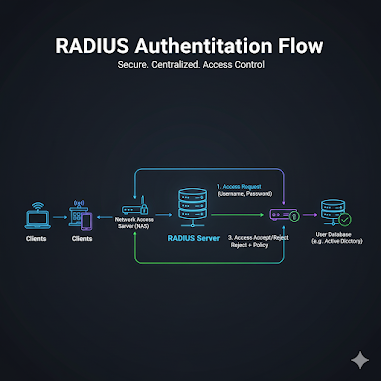
A RADIUS (Remote Authentication Dial-In User Service) server is needed for authenticating users and devices. It must work well with your CA and Wi-Fi setup.
- Select a compatible RADIUS server software or appliance.
- Configure the RADIUS server to use your CA for certificate validation.
- Test the RADIUS server connection to ensure it’s working correctly.
Compatible Access Points and Client Devices
Your access points and client devices must support certificate-based authentication. Check your devices’ specs to make sure they’re compatible.
With all these components in place and set up right, organizations can implement Wi-Fi certificate authentication well. This boosts their network security.
Preparing Your Network Infrastructure
To make certificate-based Wi-Fi authentication work well, you need to prepare your network carefully. This means looking at a few important things. These are key for a strong and growing Wi-Fi network.
Network Architecture Planning
Planning your network architecture is key. You should design a network that supports authentication well. It should also keep security and performance high. This means dividing your network to keep sensitive areas safe and using Quality of Service (QoS) to make sure authentication traffic gets priority.
Server Hardware Requirements
Your server hardware for RADIUS and certificate authority (CA) servers needs to handle the authentication load well. It should have enough processing power, memory, and storage. Also, think about making sure your servers can keep working even if one fails.
Bandwidth and Redundancy Considerations
Bandwidth and redundancy are very important for a stable and reliable connection. You need enough bandwidth to handle authentication requests quickly. And, having redundant network paths and servers helps avoid failures. Adding extra RADIUS servers and different network paths makes your Wi-Fi authentication system more reliable.
By planning your network well, checking your server hardware, and thinking about bandwidth and redundancy, you can build a strong base for your Wi-Fi authentication system.
Step-by-Step Implementation Guide
To secure your Wi-Fi network, start by setting up a reliable Certificate Authority. This is the first step in making your network secure and authentic.
Setting Up Your Certificate Authority
The Certificate Authority (CA) is key to your system. It issues, manages, and revokes digital certificates.
Installing and Configuring CA Software
To begin, install and set up CA software. You can use OpenSSL or Microsoft Certificate Services. Make sure it fits with your current setup.
Key Considerations:
- Keep the CA’s private key safe
- Set up certificate templates
- Distribute CA certificates to clients
Configuring Your RADIUS Server
A RADIUS server is vital for authenticating users and devices. It works with your Certificate Authority to check certificates.
Authentication Policies and Rules
Set up your RADIUS server with the right policies and rules. This ensures only authorized devices and users can get on your network.
Example Configuration Steps:
- Choose the right authentication protocols (e.g., EAP-TLS)
- Create user and device groups
- Make policy rules for certificate checks
Access Point Configuration
Configure your access points to work with the RADIUS server. You need to set the RADIUS server IP and shared secret.
Client Certificate Deployment
Client certificates are used for device authentication. They must be securely installed on each device.
Automated vs. Manual Distribution Methods
You can pick between automated and manual certificate distribution. Automated methods are better for large groups, while manual gives you more control.
Comparison of Distribution Methods:
| Method | Scalability | Security | Administrative Effort |
|---|---|---|---|
| Automated | High | Medium | Low |
| Manual | Low | High | High |
Best Practices for Certificate Management
Effective certificate management is key for secure Wi-Fi networks. It ensures digital certificates are handled well from start to end.
Certificate Lifecycle Management
Certificate lifecycle management includes issuance, deployment, monitoring, and revocation or renewal. It’s important to have a strong system for these steps.
- Maintain an up-to-date inventory of all certificates.
- Monitor certificate expiration dates to prevent unexpected disruptions.
- Use automation where possible to streamline certificate deployment and renewal.
Revocation Procedures
Effective revocation procedures are vital for security. They help address issues like a compromised certificate. This is done through a Certificate Revocation List (CRL) or Online Certificate Status Protocol (OCSP).
Renewal Strategies
Creating renewal strategies is key for service continuity. Plan for certificate renewals before they expire.
Avoiding Service Disruptions During Updates
To prevent service issues, carefully plan certificate updates. Use staging renewals and test them before they go live. This ensures a smooth transition.

By following these best practices, organizations can boost their Wi-Fi network’s security and reliability. Regularly reviewing and updating certificate management is vital for staying secure.
Troubleshooting Common Certificate Authentication Issues
Certificate authentication problems can really mess up your network. It’s key to fix these issues fast. If certificate authentication fails, you might face connection problems and security risks.
Certificate Validation Failures
When the client or server can’t check a certificate’s realness, you have a problem. This might be because of expired or revoked certificates, mismatched certificate details, or untrusted certificate authorities.
To fix these issues, check the certificate’s expiration date. Make sure it’s from a trusted CA. Also, confirm that the certificate matches the device or user’s identity.
RADIUS Server Connection Problems
Problems with RADIUS server connections can block authentication. Issues might include misconfigured RADIUS server settings, network connectivity issues, or authentication protocol mismatches.
To solve RADIUS connection problems, review the server settings. Make sure the network connection is good. Also, check that the authentication protocols are set right.
Client Configuration Issues
Client setup problems can also cause authentication failures. These might be due to incorrect certificate installation, misconfigured EAP settings, or outdated client software.
Device-Specific Troubleshooting Tips
Each device might need its own fix for certificate authentication issues. For instance, on Android devices, check the certificate’s storage. On iOS devices, make sure the certificate is trusted and set up correctly.
By tackling these common certificate authentication problems, network admins can keep networks safe and reliable.
Security Compliance and Regulatory Considerations
Organizations face a complex world of security rules when using Wi-Fi with certificates. They must follow industry standards, meet audit needs, and understand privacy issues.
Industry Standards Alignment
Following industry standards is key for Wi-Fi certificate security and compliance. Standards like IEEE 802.1X and EAP-TLS guide secure login methods.
These standards boost security and make sure different devices work well together.
Audit Documentation Requirements
Keeping detailed audit records is vital for showing you follow the rules. This includes tracking certificate issues, revocations, and renewals.
Good documentation helps in audits and checks, lowering the chance of not meeting standards.
Privacy Implications
Certificate-based Wi-Fi raises big privacy questions. Companies must make sure they handle user certificates right, following privacy laws.
Conclusion
Adding wi-fi certificate authentication is key to keeping enterprise wi-fi networks safe. It helps understand Wi-Fi security basics and the perks of using certificates. This way, companies can make their networks much more secure.
A safe wi-fi connection is essential for keeping data safe and stopping unauthorized access. Certificate authentication is a strong method. It checks the identity of devices and users, making sure only approved ones can get into the network.
This article has shown that securing enterprise wi-fi needs careful planning and management. Using certificate-based authentication helps lower the chance of security issues. It keeps the network safe and reliable.
With wi-fi certificate authentication, companies can protect their wireless communications. This makes their overall security stronger.
FAQ
What is Wi-Fi certificate authentication, and how does it work?
Wi-Fi certificate authentication checks devices and users before they can join a network. It uses digital certificates from a trusted source to make sure the connection is secure.
What are the benefits of using certificate-based Wi-Fi authentication over traditional password-based methods?
Certificate-based Wi-Fi authentication is more secure and easier to manage. It’s better for big companies and saves time and effort. It also keeps networks safe from weak passwords.
What is the role of a RADIUS server in Wi-Fi certificate authentication?
A RADIUS server checks who is trying to get into the network. It works with the Certificate Authority to make sure the digital certificates are valid. This ensures the network is secure.
How do I implement Wi-Fi certificate authentication in my organization?
To set up Wi-Fi certificate authentication, you need to create a Certificate Authority. Then, you must configure a RADIUS server and give out client certificates. Planning is key, including thinking about your network and servers.
What are some common issues that may arise during Wi-Fi certificate authentication implementation, and how can they be resolved?
Issues like certificate problems or server connection issues can happen. To fix these, you need to understand how the authentication works. Look for and solve any setup or certificate errors.
How do I manage digital certificates used in Wi-Fi authentication, and what are the best practices for certificate management?
Managing digital certificates is important for security. Use a lifecycle management process and have plans for revoking and renewing certificates. This keeps your network safe and running smoothly.
Are there any regulatory or compliance considerations I should be aware of when implementing Wi-Fi certificate authentication?
Yes, you need to follow industry standards and keep records for audits. Also, think about privacy. Staying compliant is key to a secure network.
For more technology‑related blog content, follow the link below